Note
Go to the end to download the full example code.
Simulating Time-dependent Emission from Impulsively Heated Loops with EBTEL#
This example demonstrates how to model the resulting AIA emission from an
arcade of loops heated impulsively and modeled using the ebtelplusplus code.
import astropy.time
import astropy.units as u
import matplotlib.pyplot as plt
import numpy as np
import sunpy.map
from astropy.coordinates import SkyCoord
from astropy.visualization import AsinhStretch, ImageNormalize, quantity_support
from sunpy.coordinates import get_horizons_coord
import synthesizAR
from synthesizAR.instruments.sdo import InstrumentSDOAIA
from synthesizAR.interfaces.ebtel import EbtelInterface
from synthesizAR.interfaces.ebtel.heating_models import PowerLawNanoflareTrain
from synthesizAR.models import semi_circular_arcade
# sphinx_gallery_thumbnail_number = -1
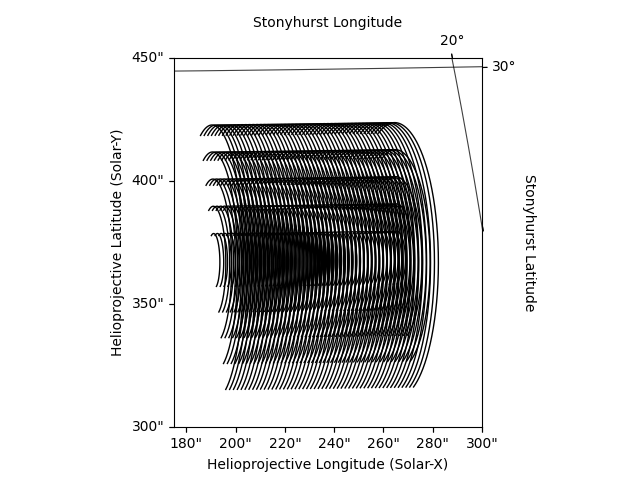
First, set up the coordinates for the arcade. The structure we will model is an arcade of longer overlying loops with an arcade of successively shorter loops underneath.
obstime = astropy.time.Time('2022-11-14T22:00:00')
pos = SkyCoord(lon=15*u.deg,
lat=25*u.deg,
radius=1*u.AU,
obstime=obstime,
frame='heliographic_stonyhurst')
arcade_coords = []
delta_s = 0.3 * u.Mm
for l in np.arange(25,150,25)*u.Mm:
n_points = int(np.ceil((l/delta_s).decompose()))
arcade_coords += semi_circular_arcade(l, 5*u.deg, 50, pos, n_points=n_points)
Next, build a Skeleton from the coordinates of the strands
in our arcade.
strands = [synthesizAR.Strand(f'strand{i}', c) for i, c in enumerate(arcade_coords)]
arcade = synthesizAR.Skeleton(strands)
We can visualize what this structure would look like as observed from the Solar Dynamics Observatory.
sdo_observer = get_horizons_coord('SDO', time=obstime)
arcade.peek(observer=sdo_observer,
axes_limits=[(175, 300)*u.arcsec, (300, 450)*u.arcsec])
INFO: Obtained JPL HORIZONS location for Solar Dynamics Observatory (spacecraft) (-136395) [sunpy.coordinates.ephemeris]
Next, we will model the hydrodynamic response to an impulsive heating event
on each strand using the ebtelplusplus code. We will simulate a total of
3 h of simulation time where each loop is heated by a single event with an
energy chosen from a powerlaw distribution.
To attach the results of our loop simulation to each strand, we pass the interface to the geometric model of our arcade we built above.
arcade.load_loop_simulations(ebtel)
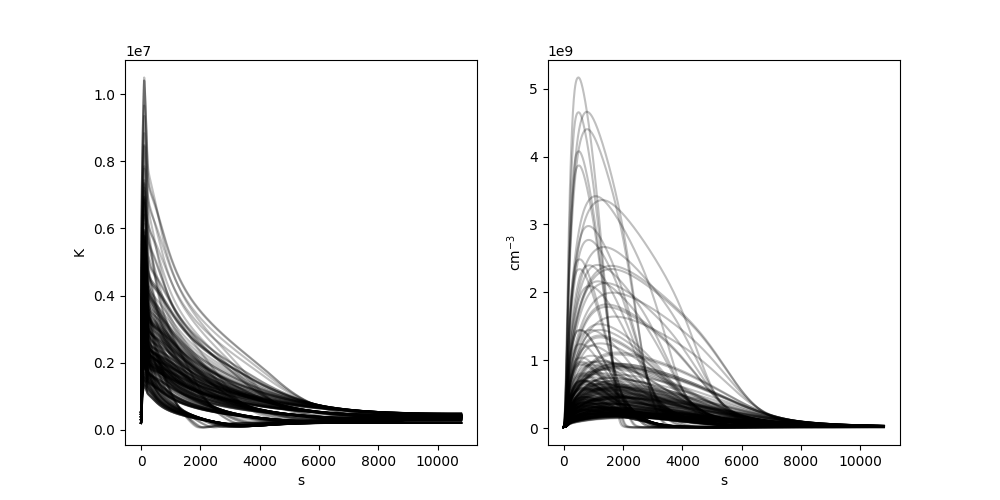
We can then visualize the temperature and density evolution of each strand as a function of time. Note that because EBTEL is a spatially-averaged model, it is assumed that eadch point along the strand has the same temperature and density.
with quantity_support():
fig = plt.figure(figsize=(10,5))
ax1 = fig.add_subplot(121)
ax2 = fig.add_subplot(122)
for s in arcade.strands:
ax1.plot(s.time, s.electron_temperature[:,0], color='k', alpha=0.25)
ax2.plot(s.time, s.density[:,0], color='k', alpha=0.25)
The last step is to use the temperature and density along each strand to compute the emission as observed by the AIA instrument. We’ll model the emission from 500 s to 6000 s at a cadence of 50 s for the 193 Å channel.
aia = InstrumentSDOAIA(np.arange(500,6e3,50)*u.s,
sdo_observer,
pad_fov=(40, 40)*u.pixel)
maps = aia.observe(arcade, channels=aia.channels[3:4])
INFO: Apparent body location accounts for 493.59 seconds of light travel time [sunpy.coordinates.ephemeris]
We can easily visualize this time-dependent emission using a
MapSequence.
mseq = sunpy.map.Map(maps['193'], sequence=True)
fig = plt.figure()
ax = fig.add_subplot(projection=mseq[0])
ani = mseq.plot(axes=ax, norm=ImageNormalize(vmin=0, vmax=5, stretch=AsinhStretch()))
plt.show()